Leírás
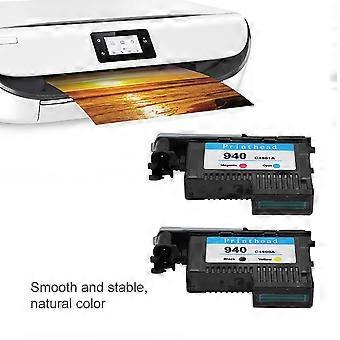
Print For 940 C4900a C4901a For 8000 8500 (ck)
1This is a professional print head that is compatible with a wide range of models 2This print head is smooth and stable, and the color is natural. It is a worthy print replacement that you deserve 3High quality ink with high degree of reduction and sufficient ink to save your cost 4The nozzle is polished, no paper jam, and the printing process is smooth 5All use Bayer raw materials from Germany, the quality is guaranteed
Features:
1. This is a professional print head that is compatible with a wide range of models.
2. This print head is smooth and stable, and the color is natural. It is a worthy print replacement that you deserve.
3. High quality ink with high degree of reduction and sufficient ink to save your cost.
4. The nozzle is polished, no paper jam, and the printing process is smooth.
5. All use Bayer raw materials from Germany, the quality is guaranteed.
Specification:
Color: Black / Yellow, Magenta / Cyan,CMYK (Optional)
Applicable models:
forHP Officejet Pro8000/8500/8500A Printhead
Size: Approx. 94 x 57 x 20 mm / 3.7 x 2.2 x 0.8in
Weight: approx. 80-160g
Package List:
2 x Print Head
Note:
Please remove the polishing cardboard nozzle and remove the orange rubber plug before installation.
Instructions:After receiving the product, remove the nozzle from the package. Before disassembling the protective device, shake the nozzle continuously to the left and right according to the figure to achieve the best use effect to achieve the best use effect. Then remove the protective device (orange with the outwardly turned handle). In order to avoid the internal inverted buckle of the protective device from damaging the circuit of the print head and causing the print head to fail to operate, pay attention to push the handle out as hard as possible. Then pull the reminder label together with the sealing blue tape to tear off. Finally, pull out the protective plug of the ink supply needle (the orange belt, please shake the nozzle arrow left and right before opening the protective clip).Installation steps:First take out the two old print heads, close the cover and turn on the printer power normally. After the print head indicator on the machine flashes, open the cover. At this time, the print head carriage (carriage) in the machine will move to the left of the machine. After it stops, install the two nozzles one by one and close the machine cover. The machine will perform calibration and print a test page. Some models will prompt "calibration failed" or "calibration failed" (this is a technical obstacle set by the original company for its products to monopolize the market, but the chip has a memory function after all nozzles are regenerated, making the calibration fail , Has nothing to do with the quality of the regeneration nozzle). In such a situation, click the "OK" or "Confirm" button on the machine panel according to the prompts, and the printing will proceed normally.Reminder:Some models will calibrate and print a test page every time they are turned on. This is normal and has nothing to do with the quality of the print head. Just click the "0k" or "confirm" button on the machine panel. It will not be calibrated every time you print without turning off the machine. Some models of the machine will perform a longer calibration before and after the first printing, which lasts about 20 minutes. At this time, please do not turn off the machine or press any control keys to avoid affecting the calibration.Precautions:(1) Avoid physical contact with the nozzle holes and circuits of the nozzle to avoid electrostatic breakdown of electronic components and damage.(2) Check whether there is enough ink in the ink cartridge of the printer at any time, and add it in time to avoid the lack of ink to burn the nozzle.(3) The machine should not be left unused for too long to avoid clogging of the nozzles without a long time.(4) The nozzles and ink cartridges should not be removed frequently or not installed for a long time, so as to prevent the ink supply pipe from entering the air and causing the ink supply to be discontinuous, and the nozzle lack of ink will affect the printing effect or burn the nozzle.(5) If it prompts "KY print head failure" or "C business head failure", try to take out the two print heads, gently wipe the circuit contacts of the failed print head with an eraser, and then install and use.(6) When the printing effect is not satisfactory, the machine with a control panel can execute the item "cleaning nozzle" in the "setting" option on the panel. When a machine without a control panel is printing, a printer icon will appear in the lower right corner of the computer screen. After clicking on it, click "Printer" and then "Properties" in the dialog box of the county float, and then find the "Printer cleaning" item after entering. Different models have different attributes, and some models may not have this function.
-
Fruugo azonosító:
219117492-467409096
Termékbiztonsági információk
Kérjük, olvassa el a termékre vonatkozó biztonsági információkat az alábbiakban
Az alábbi információkat a terméket értékesítő független, harmadik fél kiskereskedő biztosítja.
Termékbiztonsági címkék

Biztonsági figyelmeztetések:
Not suitable for children under 36 months
Hozzávalók:
Octinoxate 6.7%
Gyártói cikkszám:
996060933610
Modellszám:
996060933610
Sorozatszám:
996060933610
Tételszám:
996060933610